
AI Virtual Staging: Pros and Cons for Real Estate

Published

A vacant listing lands on a Thursday afternoon. Photos are coming back soon. The seller wants the home live before the weekend, but the empty living room looks smaller than it is, the bedroom feels flat, and the dining area has no visual anchor. That's usually the moment the decision shows up. Not whether staging matters, but which workflow fits this listing without creating new problems.
For most agents and small teams, the choice isn't philosophical. It's operational. Use AI virtual staging and move fast with a consistent look across multiple rooms, or send the files through a human editing process and accept more back and forth in exchange for tighter manual control. Both can work. Both can also go wrong if the original photos are weak, the room is tricky, or the disclosure step gets treated as an afterthought.
Buying decisions get muddy. Many pages about AI staging talk about speed, style presets, or before-and-after visuals, but they skip the parts agents have to manage on listing day. How many correction loops are realistic? Which rooms tend to break? What does the cost structure look like when a team needs staged photos and may also want video later? And how should edited media be labeled so no one is guessing?
The practical starting point is to treat this as a workflow choice, not a quality contest. AI works best when the room is standard, the photos are strong, and the team needs coverage quickly across several listing assets. Human editing earns its place when the room is visually complicated or when a premium listing needs more manual judgment. For agents who want a category-specific reference point, DwellShot's guide for virtual staging for realtors shows the kind of listing-focused workflow teams are trying to evaluate. It also matters that photo enhancement on one listing can be tried free after sign-in, while video requires paid credits.
Table of Contents
- Introduction When Staging Choice Shapes Your Listing Timeline
- How AI Virtual Staging and Human Editing Actually Work
- Turnaround and Correction Workflows Compared
- Cost Structure and Budget Planning in USD and CAD
- Difficult Rooms and Common Failure Modes to Watch For
- Accuracy Disclosure and Seller Approval Without Guesswork
- Choosing the Right Fit and Your Next Step to Try DwellShot
Introduction When Staging Choice Shapes Your Listing Timeline
The decision usually happens before the listing goes live
The listing is scheduled for tomorrow. The photos are in. Two bedrooms are empty, the living room is straightforward, and the den has awkward angles and built-ins that tend to confuse edits. At that point, the staging decision affects more than appearance. It affects whether the listing goes live on time, how many review rounds the team can absorb, and how much disclosure work needs to happen before anyone hits publish.
Staged images help buyers read a space faster. The harder question is operational. Which rooms should go through AI, which ones need a human eye, and which ones are better left untouched because the correction risk is higher than the upside?
I treat that choice as workflow planning, not a quality contest.
If the room is clean, well lit, and easy to read, AI virtual staging usually earns its place on speed and consistency. If the room has mirrors, heavy perspective issues, unusual architecture, or seller sensitivity around furniture style, human editing often saves time overall because it reduces avoidable redo cycles. A practical reference for that listing-first approach appears in DwellShot's guide to virtual staging for realtors.
Four filters matter more than hype
The first filter is time. Same-day marketing deadlines favor AI for standard rooms because the team can stage more images without waiting on a manual queue.
The second is correction load. Some rooms look simple until the first proof comes back with scale issues, furniture blocking a feature, or decor that does not fit the price point. That is where human judgment can be cheaper in practice, even if the per-image price is higher.
The third is cost structure. One vacant condo and a steady pipeline of vacant listings should not be priced the same way internally. Teams usually need to decide whether they are optimizing for cost per room, cost per listing, or total media output across photos and later edits.
The fourth is disclosure and approval. If the brokerage, MLS, or seller wants a clear record of what was digitally altered, the editing method has to fit that process instead of creating extra guesswork at the end.
A mixed workflow is often the practical answer. Use AI where the room is standard and the deadline is tight. Use human editing where the room is visually difficult or the seller expects more control over the final look. That keeps the listing moving and puts judgment where it pays off.
How AI Virtual Staging and Human Editing Actually Work
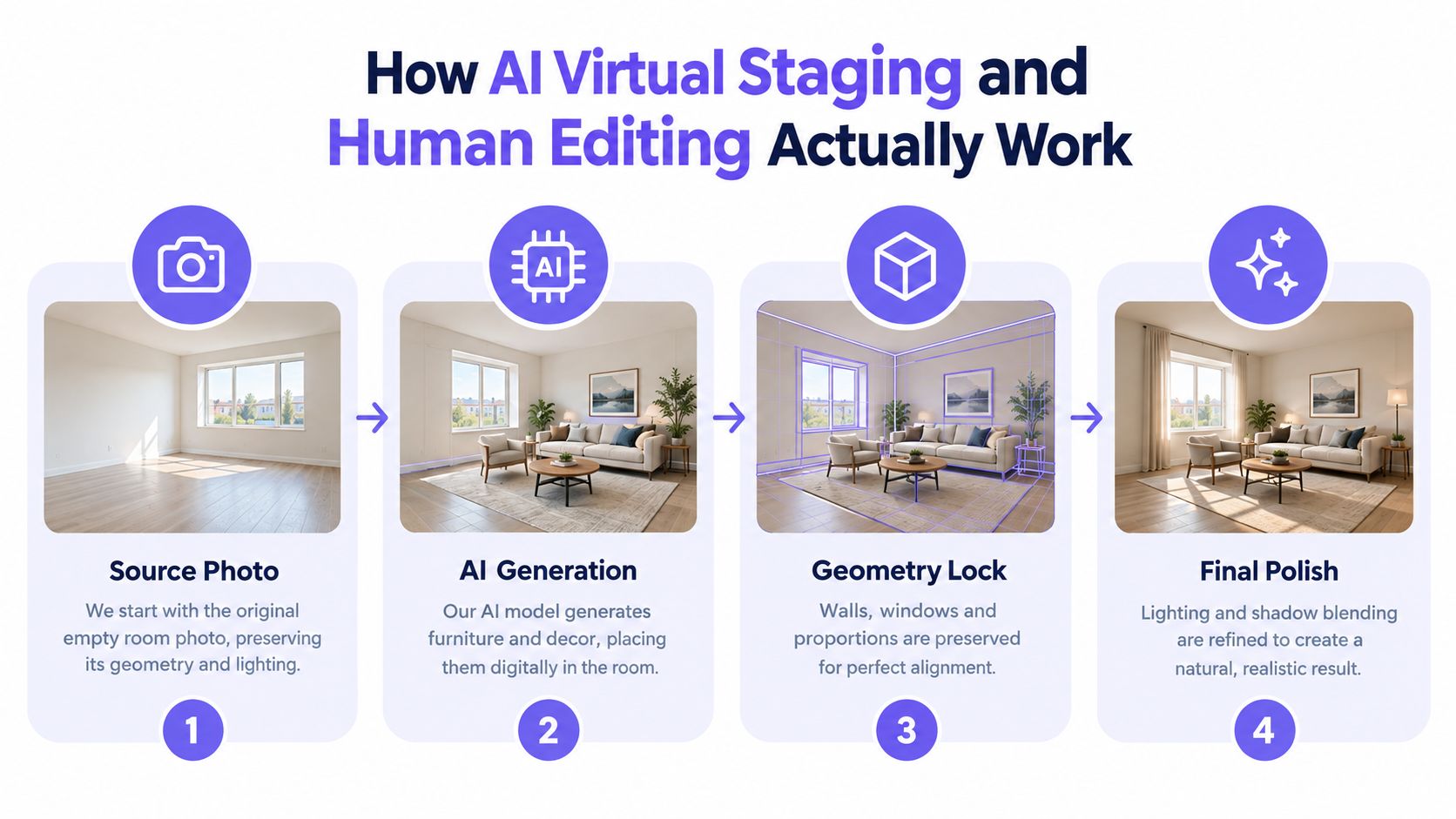
A vacant living room photo comes in at 10 a.m. The windows are bright, one corner runs a little dark, and the wide-angle lens stretched the far wall more than it should. That single file can go through two very different production paths, and the choice affects review time, correction load, and how much judgment gets applied before the image ever reaches the listing.
What AI is actually doing
AI virtual staging starts with the existing room photo and generates furniture and decor inside that scene. It reads the room's lines, light direction, floor area, and visible depth cues, then builds a staged version that tries to stay consistent with the original camera angle. If those cues are clean, AI can produce a usable draft fast. If they are weak or conflicting, the usual problems show up quickly: floating furniture, shadows falling the wrong way, objects clipping into walls, or pieces that feel too large for the room.
In practice, AI behaves like a fast first-pass layout system. It is good at standard bedrooms, living rooms, and dining spaces where the architecture is clear and the styling brief is simple. It is less reliable when the photo has heavy lens distortion, mixed lighting, reflective surfaces, or awkward built-ins that need the furniture plan to work around them.
A typical AI workflow includes a few repeating steps:
- Prepping the source image: basic exposure, straightening, and distortion correction if needed
- Selecting a style direction: modern, transitional, Scandinavian, and similar looks
- Generating staged options: one or more layouts from the same base photo
- Checking spatial consistency: scale, placement, shadows, and whether key features stay visible
- Regenerating or refining: rerunning the room if the first result misses the mark
The speed is real. So is the review burden.
What human editing changes
Human editing uses the same source photo, but the furniture is placed with direct control rather than generated as a whole scene. A retoucher can adjust scale object by object, match shadows more carefully, preserve sightlines, and make room-by-room judgment calls that matter in listing photos. That is usually the better route when the room has tricky architecture or when the seller cares about specific details, such as keeping a fireplace open, maintaining a water view, or avoiding furniture that makes the room read smaller.
Human work is slower because each decision is deliberate. It is also more forgiving when the source photo is imperfect. An experienced editor can compensate for odd corners, uneven window light, and room proportions that confuse automated systems.
The practical difference is not “AI quality versus human quality” in the abstract. It is whether the room needs interpretation. Straightforward rooms often benefit from AI speed and consistency. Difficult rooms benefit from human judgment because the correction loop is shorter once a person is making the calls from the start.
Source image quality still sets the ceiling. Good editing can improve a file, but it cannot fully rescue bad framing, severe distortion, or missing detail.
Agents who want a broader technical analogy may find Sculpty's explanation of how AI 3D modeling works useful. It helps explain why generated visual systems depend so heavily on clean spatial cues, even when the final staged image looks simple.
Turnaround and Correction Workflows Compared
A vacant condo hits the MLS on Thursday. The seller wants staged photos live before the weekend, but one room has angled ceilings and another has a wall of reflective glass. decision is not which method sounds better in theory. It is which workflow gets clean, publishable files on time with the fewest correction passes.
The AI loop is fast to start and strict on review
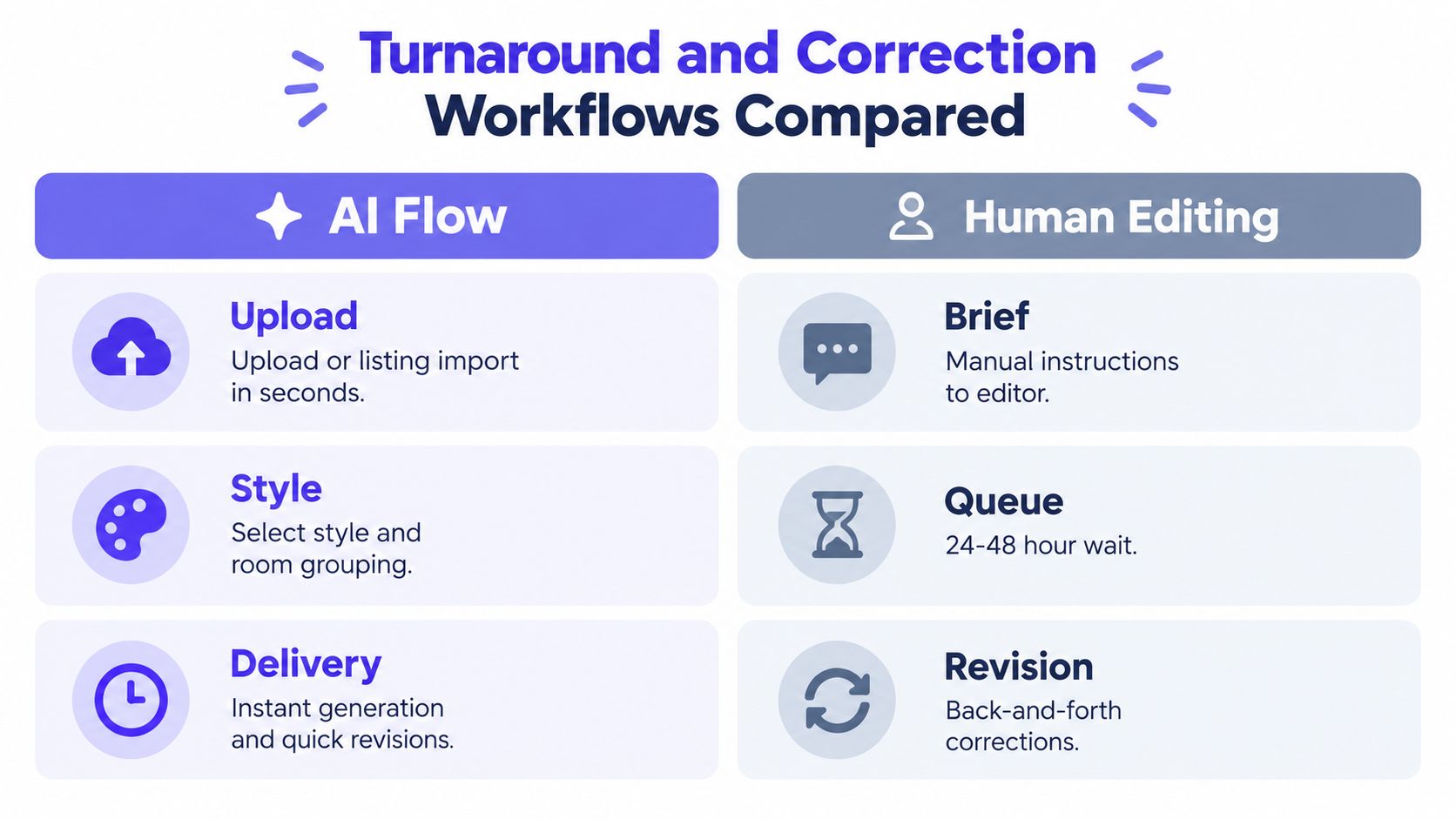
AI staging usually moves in a short cycle. Upload the photos, choose the look, keep related angles consistent, generate, then compare each result against the original before anything goes public.
That speed helps when the room is ordinary and the listing needs coverage fast. The trade-off is review time. Someone on the agent or marketing side still has to catch furniture floating slightly off the floor, decor blocking a window line, or a layout choice that makes the room read narrower than it is.
In practice, AI often saves time on version one and gives some of it back during quality control.
The human loop takes longer up front but reduces guesswork on harder files
Human editing starts with direction. The team sends style notes, flags what must stay visible, calls out problem areas, and waits for a proof. Corrections happen through comments rather than regeneration.
That adds calendar time, but the correction path is often cleaner on difficult rooms. If a photo has unusual ceiling angles, mixed light, awkward proportions, or reflective surfaces, a retoucher can make judgment calls earlier instead of forcing the agent to keep rerunning options until one is close enough.
This is why I treat staging choice as a workflow decision, not a quality contest.
Where correction policy changes the real turnaround
The headline promise is rarely the full story. Real turnaround depends on how many times the team can revise without losing a day to back-and-forth or running through paid allowances.
DwellShot states that one credit covers a base listing video, initial generation plus three full revisions, includes re-rendering of existing clips, while five shot additions or regenerations have a separate allowance and a native vertical re-shoot costs 0.5 credit. That matters because fast generation only helps if the revision structure matches the way the listing team works.
A simple rule helps here. Use AI when the room is easy to read and the team can review carefully in-house. Use human editing when the room is visually sensitive enough that early judgment will shorten the correction loop.
| Workflow point | AI virtual staging | Human editing |
|---|---|---|
| First output | Fast draft from the source image | Proof after manual queue |
| Correction style | Regenerate, adjust, and review internally | Send notes and wait for editor changes |
| Best fit | Standard rooms, broad listing coverage, tight deadlines | Difficult rooms, premium details, fewer interpretation errors |
| Main bottleneck | Internal review and approval | External queue and revision turnaround |
Decision shortcut: If the room is straightforward and the listing clock is tight, AI is usually the cleaner workflow. If the room has details that are easy to misread, manual editing often gets to final approval in fewer total rounds.
Cost Structure and Budget Planning in USD and CAD
A vacant condo hits on Thursday, photos are booked for Friday, and the listing needs to go live by Monday. The staging choice at that point is a budgeting decision tied to timeline, revision risk, and how many assets the team plans to publish.
Pricing gets clearer when it is built around the full listing package. Room-by-room math can be useful, but agents usually approve spend based on the total media plan: staged stills, possible video, and the time required to get seller signoff without another round of edits.
What the pack model means in practice
DwellShot's homepage states there is no subscription, and pricing is sold as credit packs: USD 39 / CAD 54 for 1.5 credits, USD 170 / CAD 235 for 5 credits, and USD 290 / CAD 399 for 10 credits. The same page also states that sign-in users can enhance up to 15 photos on one listing for free, including virtual staging, while video generation requires paid credits, as shown on DwellShot pricing and homepage information.
That structure fits teams with uneven listing volume. A brokerage that stages three vacant homes this month and none next month can buy for the jobs in front of it instead of carrying another monthly line item.
It also changes how to think about budget spillover between photo and video. A base listing video uses 1 credit, and a native vertical re-shoot costs 0.5 credit. If the plan might expand from staged photos to social video, it makes more sense to budget by listing campaign than by isolated deliverable.
Human editing and physical staging sit in different budget buckets
Human editing is usually a labor purchase. Physical staging is an operations purchase. They solve different problems and should not be forced into the same worksheet line.
Manual virtual staging often costs more per image than AI staging because someone is masking, placing, checking scale, and revising by hand. Physical staging adds a bigger jump in cost because it includes furniture movement, install time, and removal. The cheaper option is not automatically the better listing decision. A hard room that takes repeated AI corrections can erase part of the savings, while a clean living room may not need human intervention at all.
That is why I budget this as a workflow choice first, then a cost choice. Straightforward rooms usually justify AI because the output is fast and the unit economics stay predictable. Visually sensitive rooms deserve a higher allowance because paying more once can be cheaper than burning time through avoidable revision cycles.
| Cost Element | AI Virtual Staging | Human Editing |
|---|---|---|
| Payment model | Credits or per-use spend | Usually per image or per room |
| Upfront commitment | Can be low if the team buys small packs | Often tied to batch outsourcing |
| Budget risk | Lower on standard rooms, less predictable if many regenerations are needed | Higher starting cost, but fewer interpretation errors on difficult spaces |
| Best budgeting use | Vacant listing volume and repeatable workflows | Selective use on harder rooms or premium details |
For agents building a practical worksheet, DwellShot's guide to virtual staging cost for listing-level budgeting is a useful reference because it keeps the decision tied to actual marketing output, not just per-room sticker price.
Difficult Rooms and Common Failure Modes to Watch For
The easiest mistake in AI staging is assuming every room deserves the same treatment. It doesn't. Some spaces are naturally cooperative. Others are magnets for artifacts.
Rooms that usually behave well
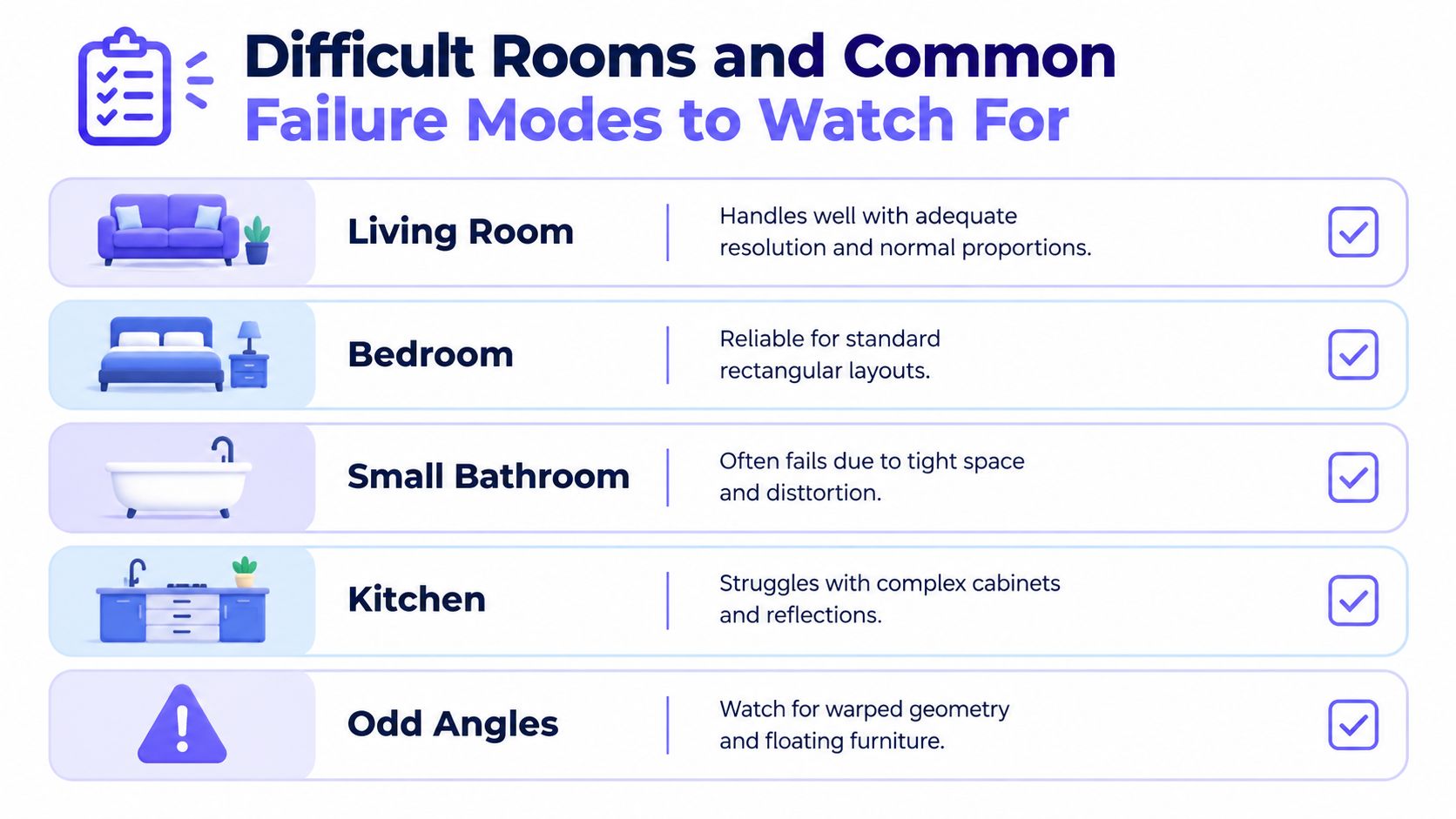
Standard living rooms and bedrooms tend to be the safest candidates when the photos are clean, the walls are visible, and the layout is easy to read. These rooms usually have familiar proportions, clear furniture zones, and fewer reflective surfaces.
Those are also the rooms where staging impact is easiest to justify. The earlier NAR-based summary linked in this article shows how important buyer visualization is, and those common rooms are where that benefit usually shows up fastest in listing media.
A quick room triage can help:
- Living rooms: Often strong candidates if corners, windows, and floor lines are visible.
- Bedrooms: Usually reliable when the bed wall is obvious and lens distortion is limited.
- Dining areas: Often workable if the table placement zone is clear and ceiling fixtures don't confuse scale.
Rooms that create more trouble
AI gets less dependable when the room asks it to infer too much. The source-quality analysis cited earlier notes that unusual layouts, strong directional light, mirrored surfaces, polished stone, and ornate period details materially increase artifact risk.
That often shows up in specific ways:
- Floating furniture: Check contact points where chairs or sofas meet the floor.
- Wrong-way shadows: Compare furniture shadows to window light and existing room shadows.
- Scale mismatches: Look at bed size against door height, nightstands against windows, and stools against counters.
- Reflection failures: Mirrors, glossy cabinets, and polished stone can expose furniture that doesn't visually belong.
Review difficult rooms at the corners, reflections, and doorways first. That's where fake depth usually gives itself away.
When to stop forcing the AI result
Some rooms shouldn't be pushed through repeated regenerations. Small bathrooms with distortion, kitchens with complex cabinet geometry, and architecturally distinctive spaces often absorb more review time than they're worth. In those cases, the better choice may be human editing or using the original photo un-staged.
Teams that want a room-priority framework can use DwellShot's article on virtual staging photos as a practical follow-up, especially for deciding which rooms deserve staging first rather than assuming the full listing needs the same treatment.
Accuracy Disclosure and Seller Approval Without Guesswork
A common listing-day problem looks like this: the staged images are approved internally, the seller likes the look, and then someone asks a basic question right before upload. Do we have the originals, how are we labeling the edited shots, and does this MLS want the disclosure in the photo, the remarks, or both?

That is why disclosure should be built into the staging workflow from the first pass, not handled at the end. AI is fast, but speed only helps if the team can trace what changed, show the original, and get seller signoff without a last-minute scramble.
The disclosure bar is getting higher
California's AB 723, effective January 1, 2026, requires brokers, salespersons, and people acting on their behalf to disclose materially altered real estate images and make the original image available. For virtual staging, that means the safe assumption is simple: if furniture, finishes, landscaping, views, or other visible property details were digitally changed, treat the image as altered and disclose it clearly.
MLS rules are also becoming more specific, even if the exact format varies by market. Some require a “virtually staged” label in a dedicated field. Others allow disclosure in captions, public remarks, or visible image text. Some also expect the unaltered version to be retained or paired with the edited version for review.
The practical point is not to memorize every rule from memory. It is to set up one review process that can adapt to local requirements.
A seller approval workflow that cuts ambiguity
The cleanest approval path uses the same file logic every time:
Keep the original image file accessible
Do not overwrite the source photo or bury it in a mixed export folder.Review original and staged versions together
Sellers approve faster when they can see exactly what was added or changed.Record what changed in plain language
“Added sofa, rug, lamps, and dining set” is more useful than “enhanced image.”Apply disclosure at upload, not from memory later
Use the MLS field, caption, remarks, or on-image label required for that listing's market.Pause on any image that could mislead
If the edit changes perceived condition, layout, view, lot lines, or permanent features, send it back for human review or use the original.
Straightforward vacant rooms usually need a quick accuracy check and clear labeling. Edge cases need more judgment, more revision control, and sometimes a human editor because the compliance risk is higher than the time savings.
One habit helps more than any policy document. Keep a simple approval set for each staged room: original image, edited image, seller signoff, and the final disclosure language used in the listing.
That record protects the team if questions come up later. It also makes correction loops easier, because everyone can see whether the problem is visual accuracy, seller preference, or disclosure format.
The same rule applies to motion content. If video is generated from still photos, label it as generated or virtually staged media. Do not present it as filmed footage.
Choosing the Right Fit and Your Next Step to Try DwellShot
The useful question isn't whether AI is better than human editing in the abstract. It's which method fits the specific listing without slowing the team down or increasing correction risk.
A simple fit test
AI virtual staging usually makes sense when the listing is vacant, the rooms are standard, and the team needs consistent coverage fast across multiple images. Human editing makes more sense when the room is architecturally unusual, visually reflective, or attached to a high-stakes presentation where manual judgment matters more than speed.
A fair trial is small. Don't judge a platform from a random hero image or a polished demo. Stage one room both ways. Use the same original photo. Then compare:
- Scale checks: Does the furniture size look believable at doors and windows?
- Shadow checks: Does the lighting direction match the room?
- Editability: Can the team correct a bad first pass without starting over?
- Disclosure readiness: Is there a clean original-plus-edited approval path?
That kind of room-level test reveals more than feature lists do.
Keep the next step narrow
For teams also evaluating broader media workflows, Hooked's overview of a real estate AI video tool is a useful directional read because it helps place staging inside the wider listing-media buying decision. Still, the strongest first move is narrower than that. Try one listing, one room, one correction cycle, and one disclosure review.
This draft includes product references because DwellShot is the publisher, and that affiliation should stay clear in any published version. Pricing should also be rechecked against the current DwellShot pricing page before publication. Any missing evidence beyond the sources cited here should be flagged for human review rather than filled in with assumptions.
DwellShot offers authorized listing-photo enhancement, AI virtual staging, branded listing videos, and a shareable listing page for agents and small teams in the U.S. and Canada. If the goal is to test whether AI staging fits a real listing before buying, visit DwellShot and use the free photo offer on one listing first, then apply paid credits only if the workflow and review process hold up.